Purchase Order Automation Software for Pharmacy Stock Replenishment
Automate your purchase orders, monitor your stock in real time, and automatically alert your team before the shelves run empty.
Automate Purchase Orders to Re-Stock Before You Run Out
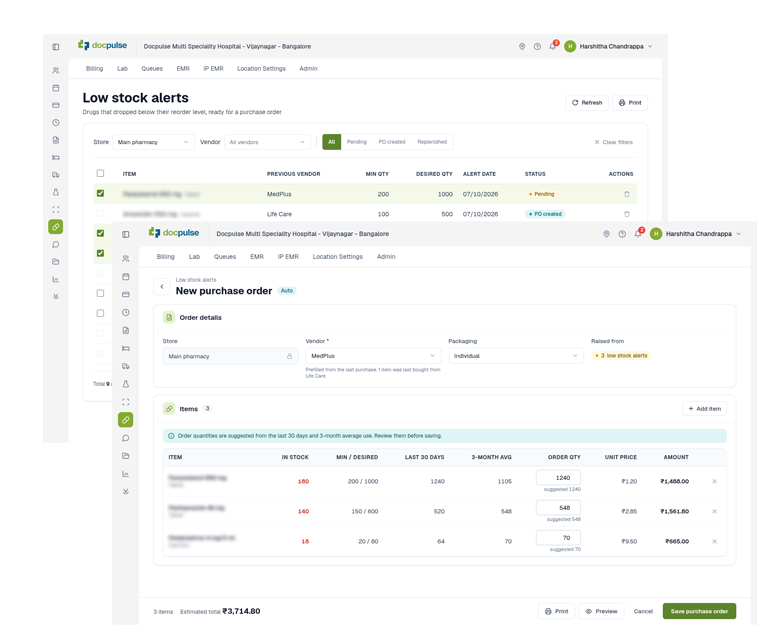
Stop discovering stockouts after a patient needs the medicine. DocPulse Purchase Order Automation Software monitors your pharmacy stock in real time and raises an alert the moment a drug crosses its reorder level. It attaches consumption history, last vendor, and last purchase price so your team can easily raise a Purchase Order before a shortage ever happens.
Real-Time Stock Check | Consumption-Based Order | Alert-to-Replenishment Tracking
Trusted By Healthcare Providers Worldwide
Hospitals and clinics across India rely on DocPulse to manage daily operations and patient care efficiently

























Who Uses DocPulse Purchase Order Automation Software?
Independent Pharmacies and Small Clinics
Checking stock by hand means you often find the gap only when a patient asks for a medicine you no longer have. Our Purchase Order Automation Software watches every drug for you and alerts you at the reorder level, with the last vendor and purchase price ready.
Multi-Specialty Clinics
When many doctors prescribe across departments, demand for a drug can shift faster than a fixed ordering habit can follow. DocPulse Purchase Order Automation Software, recalculates the suggested order quantity from your actual 30-day and 3-month consumption, so what you order always reflects what your clinic really dispenses.
Hospitals
Hospitals dispense across OPD counters, IPD wards, and OT stores, and a stockout can delay patient care. The DocPulse Purchase Order Automation Software works store by store, with one alert per drug per store and reorder levels you can set per drug or override for an individual store, so shortages get caught where they happen.
Healthcare Chains
Every branch consumes differently, so one reorder level rarely fits them all. Our pharmacy inventory software lets you set a desired stock quantity per store and raises alerts for each store separately, so each branch holds the stock its own demand needs, and a shortage at one location is flagged before it spreads.
Key Features of Purchase Order Automation Software
Automatic Low-Stock Alerts
Our purchase order automation software sends an alert the moment any drug crosses your reorder level.
Consumption History Built In
Every alert shows 30-day and 90-day consumption averages, so your team can order the right quantity without opening a single report.
Fixed Trigger, Dynamic Order Quantity
The reorder level stays constant as your low-stock warning, while the suggested order quantity is recalculated each time from actual consumption.
Last Vendor and Purchase Price Pre-Filled
The last vendor and last purchase details come attached to the alert in our pharmacy inventory software.
No Duplicate Alerts
One alert per drug per store at a time, so your alerts screen stays clean, and every alert gets attention.
Full Lifecycle Tracking
With our pharmacy inventory software, you can follow every alert from Alert to Purchase Order Created to Replenished.
STREAMLINING CARE. PROTECTING PATIENT TRUST.
Numbers That Speak For Themselves
TRUSTED DAILY
DELIVERED CARE
ALWAYS ON
PROVEN EXPERTISE
FASTER BILLING
How DocPulse Purchase Order Automation Software Works
Pharmacy dispenses a drug, and DocPulse updates the stock quantity in real time
Stocks fall below the drug's reorder level. The system triggers an alert automatically
A Low Stock Alert is created instantly, with the drug name, store, last vendor, and last purchase details
Staff raise a Purchase Order straight from the alert, with the order quantity auto-populated from actual 30-day and 3-month consumption (configurable to 6-month); the alert updates to Purchase Order Created
Goods arrive and the Purchase Invoice is recorded
DocPulse Purchase Order Automation Software vs. Manual Reorder Tracking
| Manual / Register-Based Reordering | DocPulse Purchase Order Automation Software |
Stock monitoring | Periodic shelf checks and register entries | Real-time, updated every time a drug is dispensed |
Shortage detection | Noticed only after a patient asks for the medicine | Alert raised the moment stock crosses the reorder level |
Order quantity | Guesswork or a fixed habit | Recalculated each time from actual 30-day and 3-month consumption |
Vendor and price details | Searched out of old invoices | Last vendor and purchase price pre-filled in the alert |
Order follow-through | Tracked in memory, messages, or notes | Alert → Purchase Order Created → Replenished, tracked end to end |
FAQs
What is Purchase Order Automation Software?
Purchase Order Automation Software is a DocPulse Pharmacy Inventory Software feature that monitors stock in real time and creates an alert when a drug crosses its reorder level, so your team can raise a Purchase Order before a shortage happens.
Does the Purchase Order Automation Software place orders with vendors automatically?
Your staff reviews and approves every order. Our Purchase Order Automation Software creates the alert and gathers the information, but it never submits a Purchase Order or contacts a vendor on its own.
How does DocPulse decide when to raise an alert?
Each drug has a desired stock quantity that you set, per drug or overridden per store. When stock falls below it, an alert is created by the pharmacy inventory software. You can also choose how early the alert fires as a percentage of that quantity. The default is 10%, and a higher percentage means an earlier alert.
How is the order quantity calculated?
The reorder level is only a warning trigger. The order quantity is separate and dynamic. DocPulse auto-populates it from your actual 30-day and 3-month consumption (configurable to 6-month), so the amount you order reflects real usage.
Will I get repeated alerts for the same drug?
Only one alert exists per drug per store at a time. It moves from Alert to Purchase Order Created when the Purchase Order is saved, and to Replenished automatically once the Purchase Invoice is recorded.
What do I need to start using DocPulse Purchase Order Automation Software?
Purchase Order Automation Software is an optional feature, and it works for stores that already record Purchase Invoices in DocPulse. Set a desired stock quantity for your drugs, and DocPulse switches the feature on for your pharmacy without changing your daily workflow. To get started, write to [email protected].
Never Run Low on Pharmacy Stock Again
Discover how DocPulse Purchase Order Automation Software flags low stock early, suggest the right order quantity, and keep the medicines your patients need on your shelves.
CUSTOMER STORIES
Trusted By Healthcare Professionals
Real feedback from practicing doctors, clinic administrators, and IT heads who manage 1000+ appointments, EMR records, GST billing, TPA claims, and IP/OPD workflows on DocPulse every single day.
Top Rated
Service4.5 verified by TrustindexTrustindex verifies that the company has a review score above 4.5, based on reviews collected on Google over the past 12 months, qualifying it to receive the Top Rated Certificate.


“After looking at various products, I finally zeroed down to DocPulse, which I have been using for the last 2 years. Online booking is seamless, Queue Management & Vaccine reminders are appreciated by my patients. I highly recommend DocPulse.”
Dr. Naveen Kini
Pediatrician, India
“DocPulse EMR is simple, and easy to use. When patients contact me over e-consultation, all their past history is in one place which helps a lot. The team is very responsive, and I highly recommend them.”